1Learning Outcomes
Define thread, program, and process.
Differentiate between software thread and hardware threads.
Explain how (and why!) the OS performs context switches.
Explain at a high-level how single-core processors can run multithreaded programs, and how multicore processors can speed up execution of such programs.
🎥 Lecture Video
A thread (short for a thread of execution) is a single stream of instructions. A process is an instance of a currently running program. A process is composed of a single thread’s execution, or multiple threads, which execute concurrently.
Threads are an easy way to describe/think about parallelism, but their implementation is quite complicated and out of the scope of this course. Nevertheless, we describe some details that will help you understand the thread model of execution.
2Thread model of execution
2.1Thread state
Each thread maintains state as shown in Figure 1:
Values of its own registers (including stack pointer)
Value of its own program counter (PC)
Shared memory (heap, global variables) with other threads
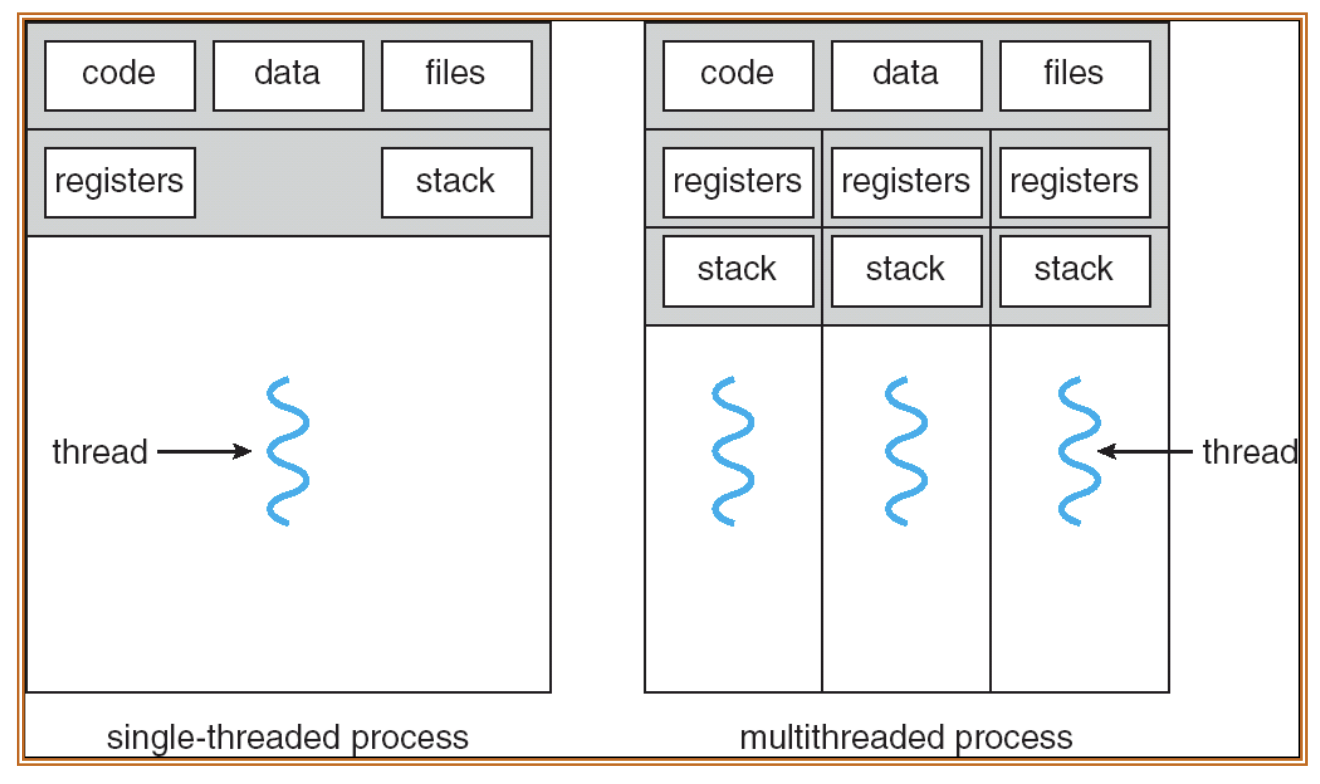
Figure 1:Single-threaded process vs. multi-threaded process.
2.2Fork-Join Model
We assume that multi-threaded processes run using the fork-join model in Figure 2:
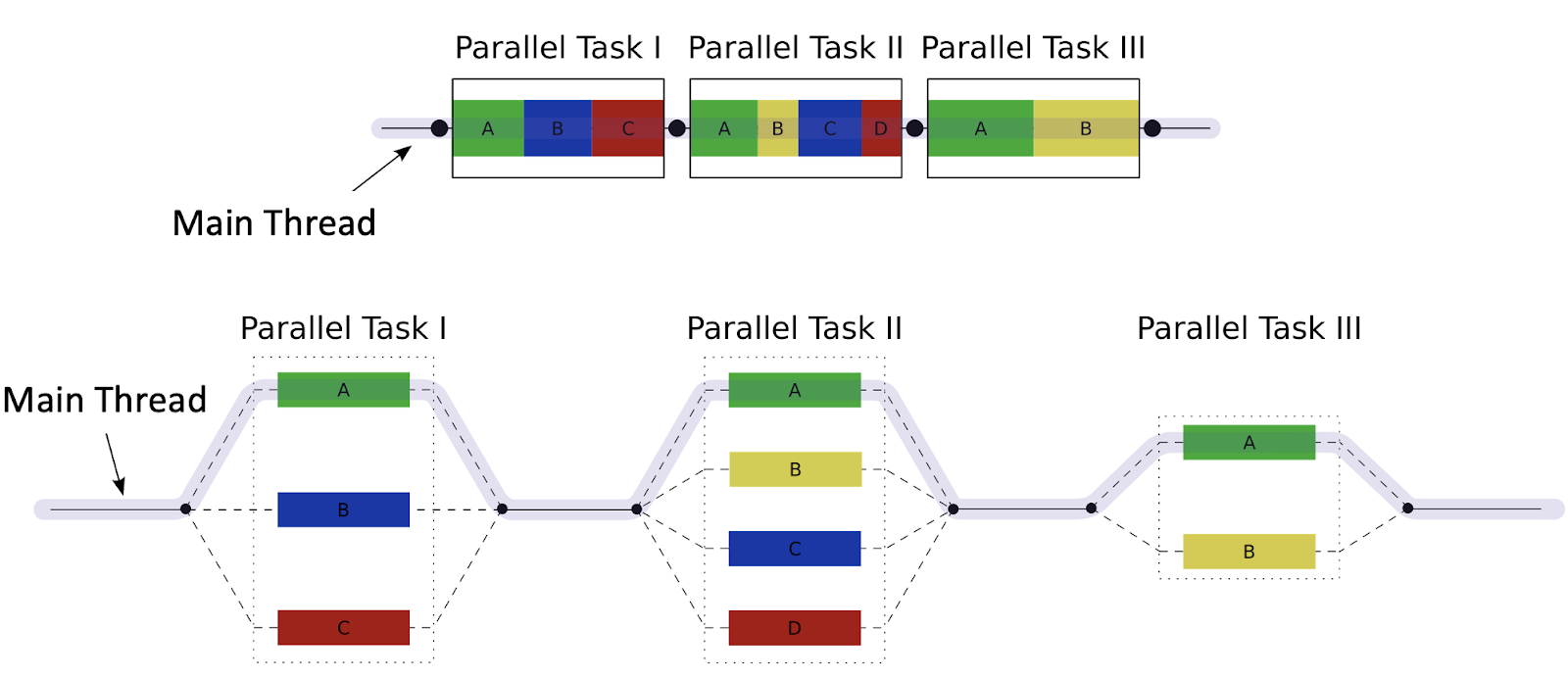
Figure 2:Fork-join model over time with multiple parallel tasks off the main thread. Top: Parallel Task I is composed of concurrent threads A, B, C; Task II is composed of A, B, C, and D; Task III is composed of A, B. Bottom: Main Thread forks into the three threads for Parallel Task I, then joins, then forks into the four threads for Parallel Task II, then joins, then forks into the two threads for Parallel Task III, then joins and finishes execution.
The “main thread” executes sequentially until the first parallel task region.
Fork: When the first parallel task region is encountered, the main thread then creates a team of parallel subthreads, which execute to completion.
Join: When subthreads complete their parallel task region, they synchronize and terminate, leaving only the main thread. The main thread then executes sequentially until it needs to fork another parallel task region.
3A Warning about Threads
From UC Berkeley Professor Emeritus Edward Lee:
Although threads seem to be a small step from sequential computation, in fact, they represent a huge step. They discard the most essential and appealing properties of sequential computation: understandability, predictability, and determinism. Threads, as a model of computation, are wildly nondeterministic, and the job of the programmer becomes one of pruning that nondeterminism.
“The Problem with Threads.” Edward Lee[1]
As we will see over the next few sections, thread-level programming is hard.
4Executing Threads on Hardware
We are so sorry,[2] but we will introduce one more set of terms to describe how threading works in hardware:
A software thread is one of the threads that composes a multi-thread process. When we colloquially say “thread,” we are usually referring to a software thread.
Each core provides one (or more) hardware threads that actively execute instructions.
An active thread is a software thread that is currently mapped to a hardware thread and executing. All software threads that are not active wait until they are able to execute.
A special program called the Operating System “multiplexes”[3] multiple software threads onto the available hardware threads. With the OS’s help, a single-core CPU can “concurrently” execute many threads by time-sharing the processor between the threads, as shown in Figure 3.
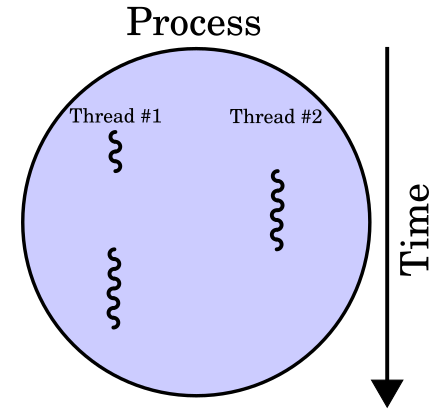
Figure 3:Process over time when executing multiple threads on a single-core CPU.
5The OS: Thread Context Switch
On most modern computers, the number of active threads is much larger than the number of available cores, so most (software) threads are idle at any given time. The OS is responsible for (among other tasks) managing which threads get run on which CPU via a process called context switching.
The OS performs a thread context switch for two main reasons:
Switch out blocked threads (e.g., cache miss, user input, network access, disk access). The OS switches to another thread to avoid stalling the CPU for an extended amount of time.
Timer (e.g., switch active thread every 1 ms). The OS switches to another thread to allow multiple threads to execute concurrently, even when hardware threads are limited.
To switch to a different thread in the process, the OS does the following:
Removes the old software thread from the hardware thread by interrupting its execution. Save the old software thread’s state, e.g., register values (including PC value) and stack pointer to memory. Because threads in the same process share memory, we keep any memory tables.[4]
Start executing a different software thread. Load its state into the hardware thread’s registers (including the thread’s PC value). Then, run the hardware thread by reading the value of the PC (which is the address of the next instruction of the newly active thread).
The OS can also perform context switches to multiplex different processes. We leave the description of process context switches to a later section
6Hardware Multithreading
Up until now we have maintained that one core has one hardware thread running on it. Some architectures can support hardware multithreading—when we run multiple hardware threads* on the same core.
Logical CPUs: Effectively, the number of hardware threads.
Physical CPUs are the true number of hardware cores, where each core could potentially have multiple logical CPUs due to multithreading.
Intel chips use hardware multithreading[5], whereas many modern Apple chips do not. The below lscpu command[6] run on our course hive machines tells us that we have six physical cores and two threads per core for a total of 12 logical CPUs.
$ lscpu
CPU(s):                   12
  On-line CPU(s) list:    0-11
Vendor ID:                GenuineIntel
  Model name:             Intel(R) Core(TM)
                          i7-8700T CPU @ 2.40GHz
    CPU family:           6
    Model:                158
    Thread(s) per core:   2
    Core(s) per socket:   6
Socket(s): 1🎥 Lecture Video
Briefly—the hardware multithreading model is in Figure 4. Here, each core can run multiple threads at the same time. The two hardware threads share resources like the cache, the ALU unit, etc., but have separate state (PC, registers, etc.) This design leverages “Moore’s Law” because transistors are aplenty.
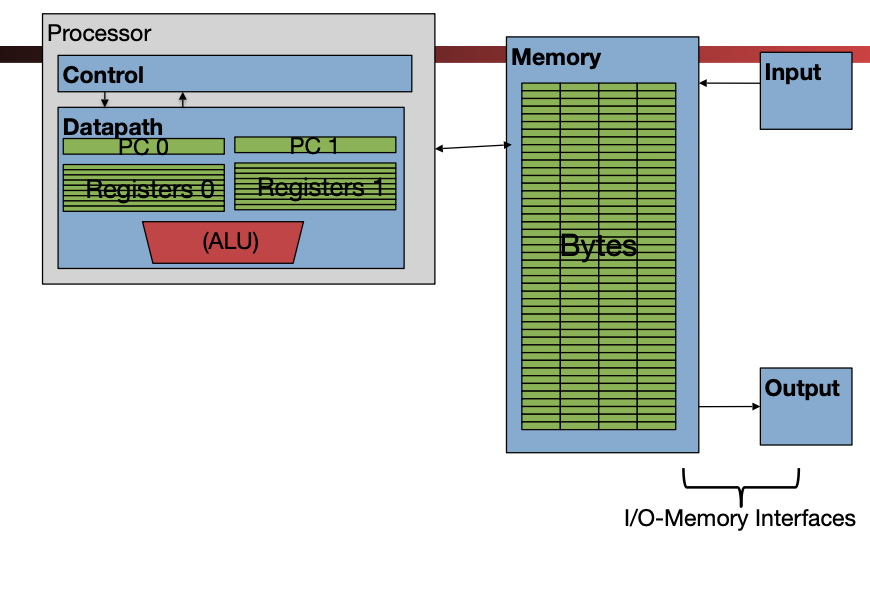
Figure 4:Hardware multithreading: multiple threads active in the same processor.
Hardware multithreading reduces the overhead of a context switch. When the active hardware thread encounters a cache miss, the other hardware thread can be swapped in quickly and run until the data for the original hardware thread is available.
Edward A. Lee. “The Problem with Threads.” Technical Report No. UCB/EECS-2006-1. January 2006. See also: Computer 39, 5 (May 2006), 33–42. DOI
From an earlier section: “Because of the abrupt shift in processor design towards parallelism, there are a LOT of closely related terms when it comes to parallelism.”
We use the term “memory tables” colloquially here to refer to all extra information to speed up memory access needed for this particular process. We mean caches and virtual memory page tables.
Intel uses yet another term to describe hardware multithreading: hyperthreading. Woo terminology!!
lscpualso lists the extensions available on this machine:pu vme de pse tsc msr pae mce cx8 apic sep mtrr pge mca cmov pat pse36 clflush dts acpi mmx fxsr sse sse2 ss ht tm pbe syscall nx pdpe1gb rdtscp lm constant_tsc art arch_perfmon pebs bts rep_good nopl xtopology nonstop_tsc cpuid aperfmperf pni pclmulqdq dtes64 monitor ds_cpl vmx smx est tm2 ssse3 sdbg fma cx16 xtpr pdcm pcid sse4_1 sse4_2 x2a pic movbe popcnt tsc_deadline_timer aes xsave avx f16c rdrand lahf_lm abm 3dnowprefetch cpuid_fault epb pti ssbd ibrs ibpb stibp tpr_shadow flexpriority ept vpid ept_ad fsgsbase tsc_adjust bmi1 avx2 smep bmi2 erms invpcid mpx rdseed adx smap clflushopt intel_pt xsaveopt xsavec xgetbv1 xsaves dtherm ida arat pln pts hwp hwp_notify hwp_act_window hwp_epp vnmimd_clear flush_l1d arch_capabilities ibpb_exit_to_user
- Lee, E. A. (2006). The Problem with Threads. Computer, 39(5), 33–42. 10.1109/mc.2006.180