1Learning Outcomes
Explain, at a high-level, the operating system’s role in address translation and handling page faults with context switches.
Define demand paging and explain the starting state of page tables in a system that uses demand paging.
🎥 Lecture Video
Virtual memory manages the two levels of the memory hierarchy represented by main memory and disk. The “memory manager” performs translation and data management and is a combination of hardware (in the CPU) and software (the OS).
The “memory manager” satisfies several responsibilities:
Address translation. Conceptually, each process is mapped to a part of the memory through the translation of its virtual addresses to physical addresses. The parts of memory used by a process are not necessarily contiguous; in practice, they are interleaved and spread throughout DRAM.
Protection and isolation. Each process has its own dedicated “private” part of memory, maintained by the address mappings stored in its own page table. Runtime errors that occur in one process do not corrupt the memory of another; a user program is prevented from messing with the OS’s memory and consequently crashing the system.
Data management between memory and disk. Disk is usually much larger than DRAM. The memory manager gives the illusion of larger memory by swapping out select pages to disk; such pages are chosen based on some metric of locality, e.g., most recently used.
2Page Fault Exceptions
In the CPU, there is hardware for address translation: a memory management unit. This hardware unit splits the virtual address into the virtual page number and offset within the page and accesses the page table. If the page is not currently in memory, the hardware raises a page fault exception.[1] Upon this page fault exception, control is transferred to the page fault exception handler—a supervisor-level OS procedure that performs the following:
Initiates transfer between memory and disk.
If out of memory, first select a page to replace in memory.
If needed, write the outgoing page to disk.
Load the requested page from disk into memory.
Perform a context switch so that another user process can use the CPU while the disk transfer happens.
Following the page fault, re-execute the instruction.[2]
2.1Process Context Switches
Earlier, we described thread context switches. To switch between processes, update state as follows:
Save the outgoing process’s state: register values, program counter, page table base register, stack pointer, etc.
Load in the incoming process’s state.
Update the virtual memory space to the incoming process. Do this by invalidating memory caches and the translation lookaside buffer.
We don’t do the last of these with thread context switches, because threads from the same process share the same virtual address space.
3Demand Paging
As mentioned in an earlier section, the OS also performs the load part of CALL—meaning, the OS loads a program into a new virtual address space and runs it. Upon starting this new process, what is its memory footprint? No matter what, the OS must allocate enough space in memory for a new page table for this process. But what about memory pages corresponding to data and instructions?
Preloading in numerous pages for every new process is wasteful. For example, with tiny programs like “Hello World”, most pages are never used, so allocating the full virtual address space to memory at startup (i.e., assign every virtual page to a physical page in memory) seems nonsensical.
In a system that uses demand paging,[4] a process begins execution with none of its pages in physical memory. In other words, all of its page table entries are invalid. Then, when a page is actually requested, load the page from disk into memory.
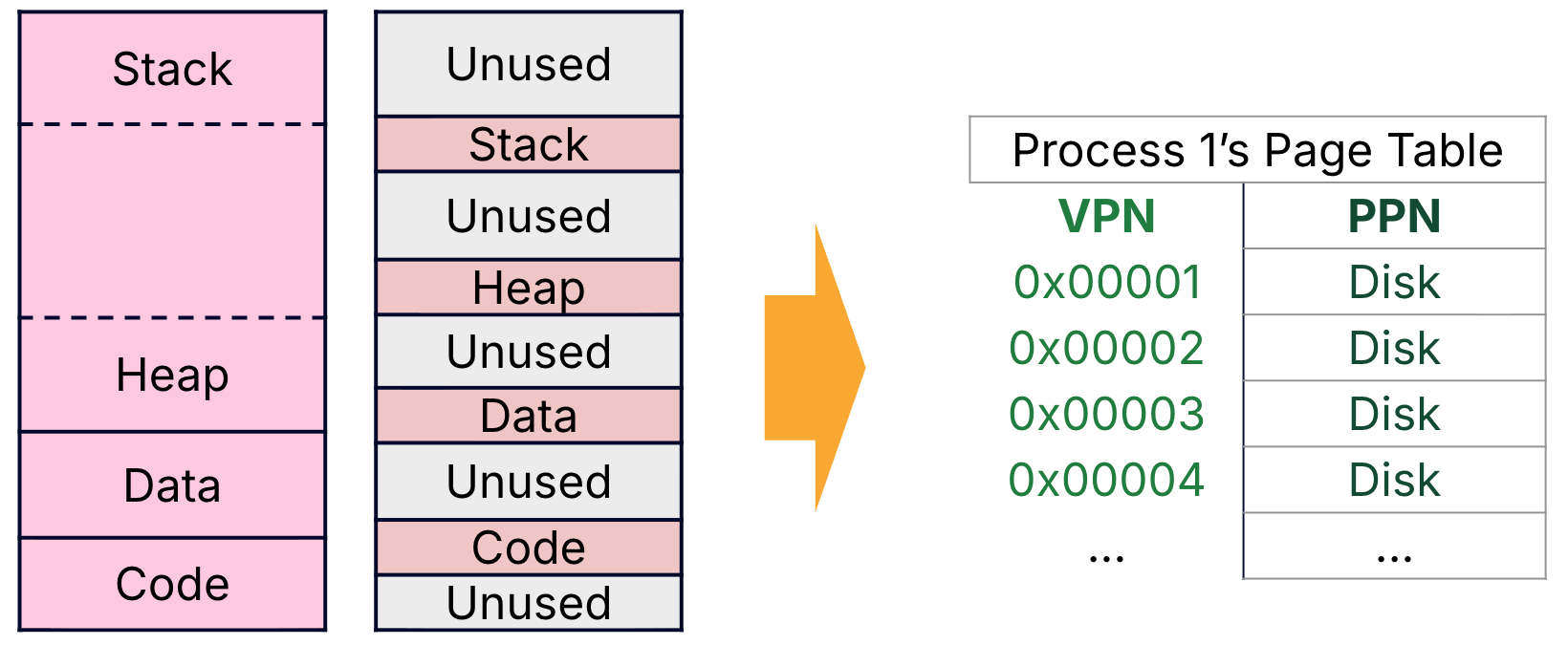
Figure 1:Our VM abstraction allows a program to use the full virtual address space, but some programs use only a tiny amount of memory. Demand paging means that new processes have page tables that start with entries that are all invalid.
Demand paging prevents over-allocating memory to a process (and thereby supports running many processes on a limited amount of memory), but the startup cost is high for new processes.
An exception is an OS action caused by an event during the execution of the current process. When an exception is triggered, it must be handled immediately by the OS. Example exceptions include: illegal instructions, divide by zero, write protection violations (i.e., writing to a protected page), and page faults. In the last case, the OS page fault exception handler performs a context switch. In the other cases, the OS kills the process.
An interrupt is an OS action caused by an event external to the current running program. When an interrupt occurs, it is asynchronous to the current process, meaning it does not need to be handled, but should be handled soon. Example exceptions include: key press, disk I/O. A page fault triggers an exception; at a high-level, the OS sets a timer on the order of a thousand cycles and performs a context switch. Expiration of the timer triggers an interrupt, during which a context switch is performed to switch back to the original process to re-execute the instruction.
Jim Gray’s analogy figure for your reference.
Read more on Wikipedia about demand paging and its counterpart, anticipatory paging.