1Learning Outcomes
Describe virtual memory system design: placement policy, replacement policy, and write policy.
Describe how virtual memory implements protection.
Describe status bits tracked for page table entries.
🎥 Lecture Video
2Virtual Memory System Design
Recall that when we introduced caches in an earlier section, we extensively discussed design tradeoffs. Physical memory is just another layer of the memory hierarchy—where now, memory is a “cache” for disk. We therefore revisit the design questions below, now for our virtual memory system:
Page Placement Policy
Most virtual memory systems opt for minimizing this cost and thus allow pages to be placed anywhere in main memory.
Using the terminology of cache associativity, this page placement strategy is fully associative. The cost of this policy is minimal compared to the cost of a page fault because (1) disk access dominates the penalty of time, and (2) the placement algorithm is determined in software, not hardware (see the “memory manager”).
Page Identification
A page’s location is determined by accessing the page table for the physical page number. See the two cases discussed in this section.
Page Replacement Policy
Almost all virtual memory systems try to replace the least recently used (LRU)[1] page to maximize temporal locality. As mentioned earlier, the overriding guideline is to minimize page faults. Relative to the cost of a page fault, the cost of software and hardware to maintaining data for least recently used pages is small.
Write Policy
The write strategy for virtual memory systems is always write-back. We probably sound like a broken disk record at this point, but just once more for good measure: disk accesses are expensive. Write-through policies, which access disk on every write, are infeasible.
3Page Table Details
In this section, we expand on the brief description of the page table from an earlier section on address translation:
Consider the page table layout in Figure 1. The page table is effectively “one giant array” with one entry per virtual page number. A valid entry means that the page is in memory, and each valid entry has a physical page number that can be used to construct a physical address on memory access. Each entry also has status bits, which we discuss below.
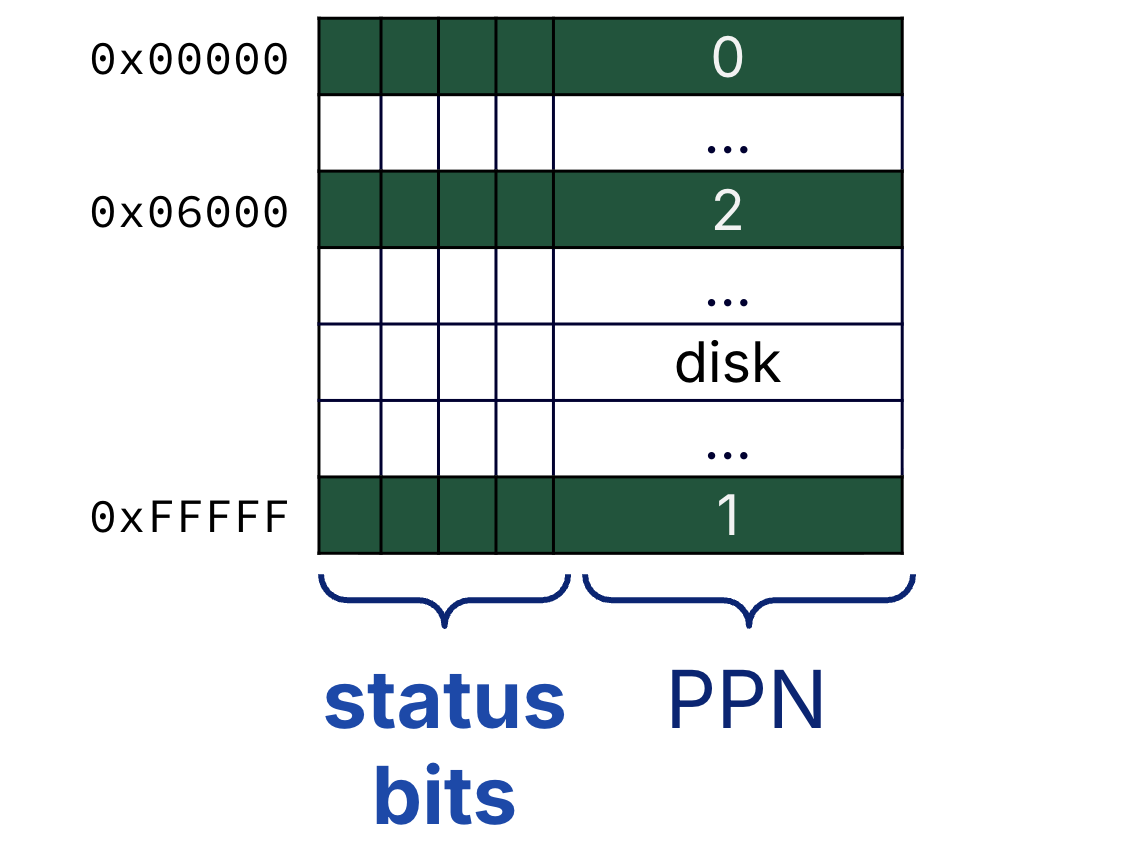
Figure 1:Each process has a page table.
Show Answer
False. A page table is a lookup table, not a cache.
Recall from an earlier section that caches contain copies of a subset of data from a lower layer of the memory hierarchy. A page table does not satisfy this definition for multiple reasons.
An entry in the page table contains an address translation; it does not contain (program) data.
There is one entry in the page table for every single virtual page number. The page table is the set of possible translations itself; it is not a strict subset.
Show Answer
If pages are 16 KiB = B in size, then the virtual page number and page offset occupy the upper 18 bits and lower 14 bits, respectively, of the virtual address.
Our assumption in this course is that there is one page table entry for each and every virtual page number. The total page table size is then = 220 B = 1 MiB.
The page table is too big, so it cannot fit in the cache. The page table must be stored in memory!
4Implementing Protection with Virtual Memory
Each running process has a dedicated page table. In Figure 2, there are three processes that are currently running (either currently running on the processor, or waiting to be run and completed). Each process has a separate page table, and each valid page table entry maps a virtual page from the process to a physical page in memory.
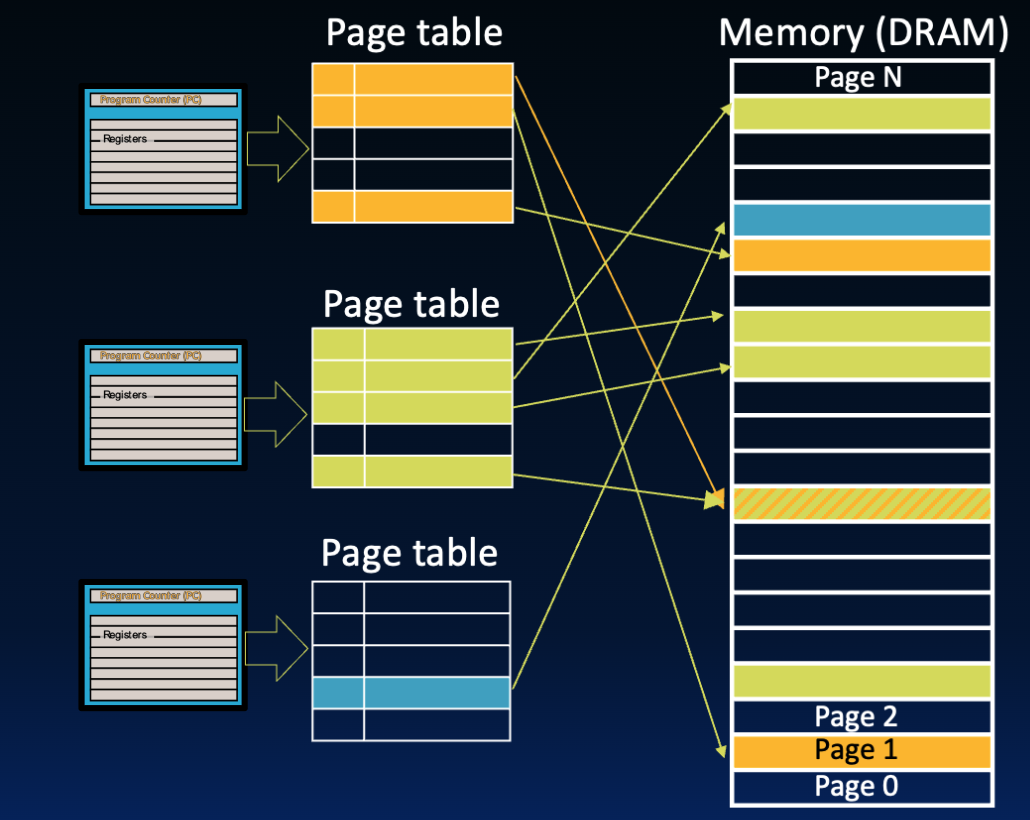
Figure 2:Three processes each have a page table, where valid entries in the page table map to different pages in physical memory. Processes can share physical pages using a write protection mechanism.
Remember that a key motivation for virtual memory is to allow safe sharing of a single main memory by multiple processes. We highlight key mechanisms of memory protection:[3]
The flexible placement policy of virtual memory systems means that physical pages allocated to a process do not have to be allocated in order on memory. The mapping is intentionally determined by the “memory manager” (i.e., OS), which organizes page tables so that all virtual pages that should not be shared between processes are mapped to disjoint physical pages.
We also see in Figure 2 that some processes can share physical pages. The write protection bit (write access bit) in page table entries can enable limited sharing of data between two processes.
Portions of physical memory can be marked as protected address space, accessible only by the supervisor mode of the OS. Page tables are placed in this protected address space to ensure that user processes cannot modify any page tables (including its own).
5Status Bits
Page table status bits (1) implement various choices in virtual memory design, and (2) provide process isolation.
5.1Valid Bit
Page table entries track a valid bit to indicate if the page is in memory (DRAM) or only on disk. On each memory access, first check if page table entry is valid.
If the valid bit is set (on), then the page is in memory. The entry’s physical page number can be read and used in address translation.
If the valid bit is not set (off), then the page is on disk. A page fault exception is triggered. After some time, the page is copied from disk into memory. Because the page is now in physical memory, the corresponding page table entry (for the page’s virtual page number) is updated with the physical page number and valid bit set.
5.2Dirty Bit
Virtual systems implement a write-back policy, and most do so by tracking a dirty bit. When a page is replaced, check the dirty bit in its page table entry.
If the dirty bit is set, write the outgoing page back to disk.
If the dirty bit is not set, do not perform a disk write.
In a demand paging system, newly created page tables have all valid bits unset (off).
5.3Write Protection Bit
Address translation is a feature that allows multiple programs to easily share memory, e.g., if they have the same <stdlib.h> library code. To do so, direct two processes to the same physical page by setting the corresponding entry in each page table.
An example is shown in Figure 2. The first entry in the orange page table and the last entry in the green page table share entries. In this way, the two processes can have different virtual page numbers for the same physical page in memory.
The write protection bit, also known as write access bit, can protect a page from being written. This enables processes to share information in a limited way. From P&H 5.7: “To allow another process, say, P1, to read a page owned by process P2, P2 would ask the OS to create a page table entry for a virtual page in P1’s address space that points to the same physical page that P2 wants to share. The OS could use the write protection bit to prevent P1 from writing the data, if that was P2’s wish.” Common write-protection applications are library code, system data, etc.
If a process violates the write protection policy by attempting to write to a protected page, an OS exception is triggered. Read more about the “memory manager” in this section.
6Hierarchical Page Tables
🎥 Lecture Video
To be precise, from Computer Architecture, Appendix B: “many processors provide a use bit or reference bit, which is logically set whenever a page is accessed. ... The operating system periodically clears the use bits and later records them so it can determine which pages were touched during a time period. By keeping track in this way, the operating system can select a page that is among the least recently reference.”
We assume a single-level page table hierarchy in this course. In practice, multi-level (hierarchical) page tables are used to reduce the size of the page table. Read more in the extra section.
In earlier versions of RISC-V, the page table base register was called the SPTBR (“S” for “Supervisor”). V1.10 updates the name to SATP (Supervisor Address Translation and Protection). See Volume II: RISC-V Privileged ISA Specification.