1Learning Outcomes
Explain how caches leverage temporal and spatial locality.
Trace memory access with caches.
Get familiar with key cache terminology: cache hit, cache miss, block (cache line), tag.
🎥 Lecture Video: Locality, Design, and Management
🎥 Lecture Video
2Principle of Locality
How do we create the illusion of a large memory that we can access fast? From P&H 5.1:
Just as you did not need to access all the books in the library at once with equal probability, a program does not access all of its code or data at once with equal probability. Otherwise, it would be impossible to make most memory accesses fast and still have large memory in computers, just as it would be impossible for you to fit all the library books on your desk and still find what you wanted quickly.
Caches are the basis of the memory hierarchy. They contain copies of a subset of data from main memory.[1]
Table 1:Principles of temporal and spatial locality.
| Property | Temporal Locality | Spatial Locality |
|---|---|---|
| Idea | If we use it now, chances are that we’ll want to use it again soon. | If we use a piece of memory, chances are we’ll use the neighboring pieces soon. |
| Library Analogy | We keep a book on the desk while we check out another book. | If we check out volume 1 of a reference book, while we’re at it, we’ll also check out volume 2. Libraries put books on the same topic together on the same shelves to increase spatial locality. |
| Memory | If a memory location is referenced, then it will tend to be referenced again soon. Therefore, keep most recently accessed data items closer to the processor. | If a memory location is referenced, the locations with nearby addresses will tend to be referenced soon. Move blocks consisting of contiguous words closer to the processor. |
3Key Cache Terminology
From Wikipedia:
Data is transferred between memory and cache in blocks of fixed size, called cache lines or cache blocks. When a cache line is copied from memory into the cache, a cache entry is created. The cache entry will include the copied data as well as the requested memory location (called a tag).
Memory is byte-addressable, meaning each byte in memory has a memory address. This is identical to our concept of memory from earlier. Just like memory, caches need to look up data by memory address (see below). However, now a cache no longer has access to the entire memory address space because of its limited storage capacity.
Each entry in the cache therefore needs to track (at least) two pieces of information:
Cache blocks (also called blocks, or cache lines)[2] are the unit of data are copied from memory to the cache. A block is the smallest unit of memory that can be transferred between the main memory and the cache. Copying over a line of data (instead of simply a word, or a byte) helps us take advantage of spatial locality.
Each block has its own entry in the cache.
Tag: The address(es) associated with data in a block.
From P&H 5.3: “A tag is a field in a table used for a memory hierarchy that contains the address information required to identify whether the associated [line] in the hierarchy corresponds to a requested [word or byte].”
Each cache entry has its own tag. Each block is therefore associated with one tag.
Size-related terminology:
Block size (also called line size) is the number of bytes of data stored in this block. Each block in a cache has the same block size. To take advantage of spatial locality, caches usually have a block size larger than one word.
Capacity is the size of a cache, in bytes.
4Memory Access with/without a Cache
When a load or store instruction is accessed, the processor requests data at a particular address from the memory hierarchy. In this subsection we contrast how this memory access works—with and without a cache. Toggle between the two cards below.
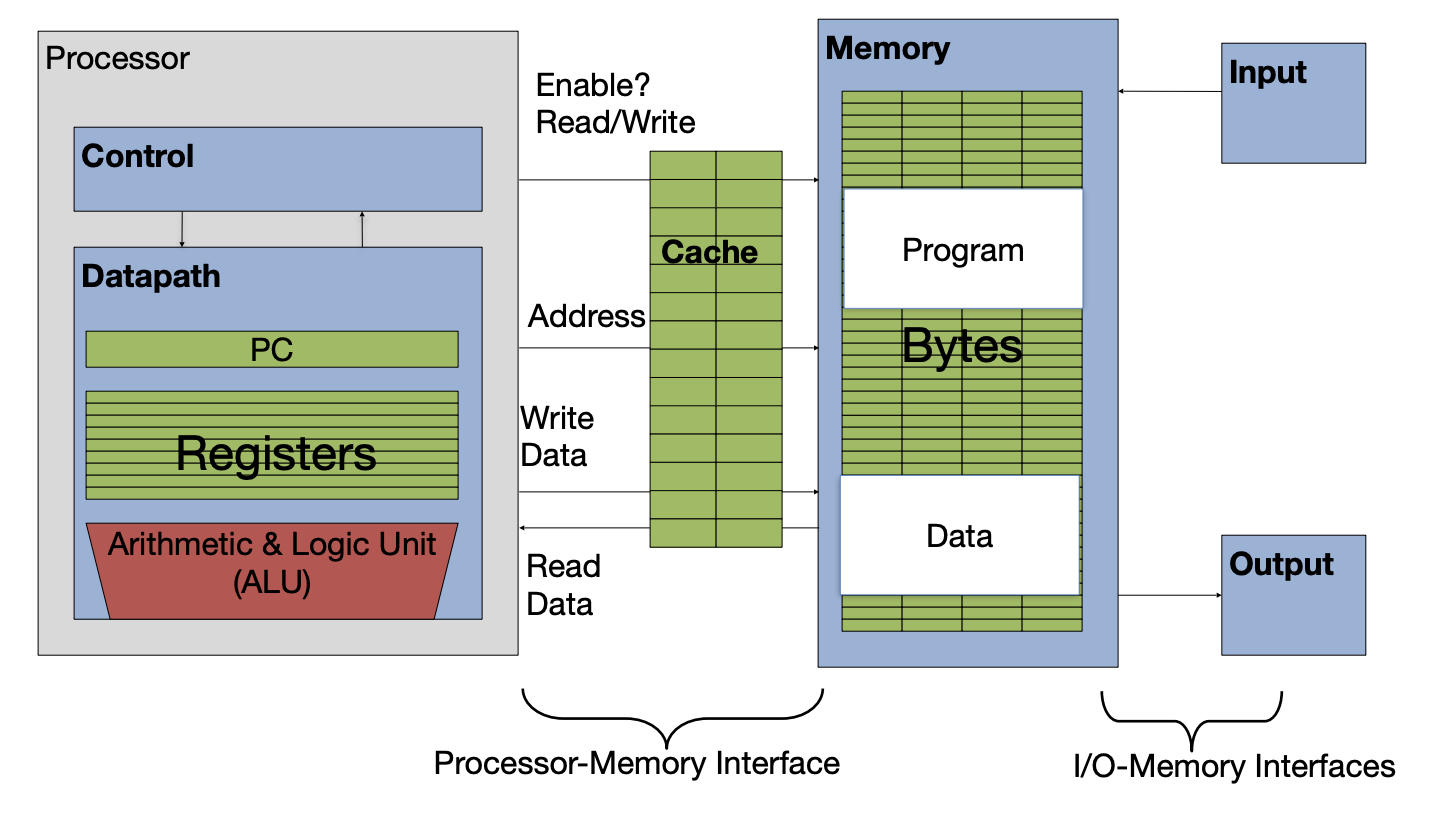
Figure 1:A cache inserted into the basic computer layout from an earlier section.
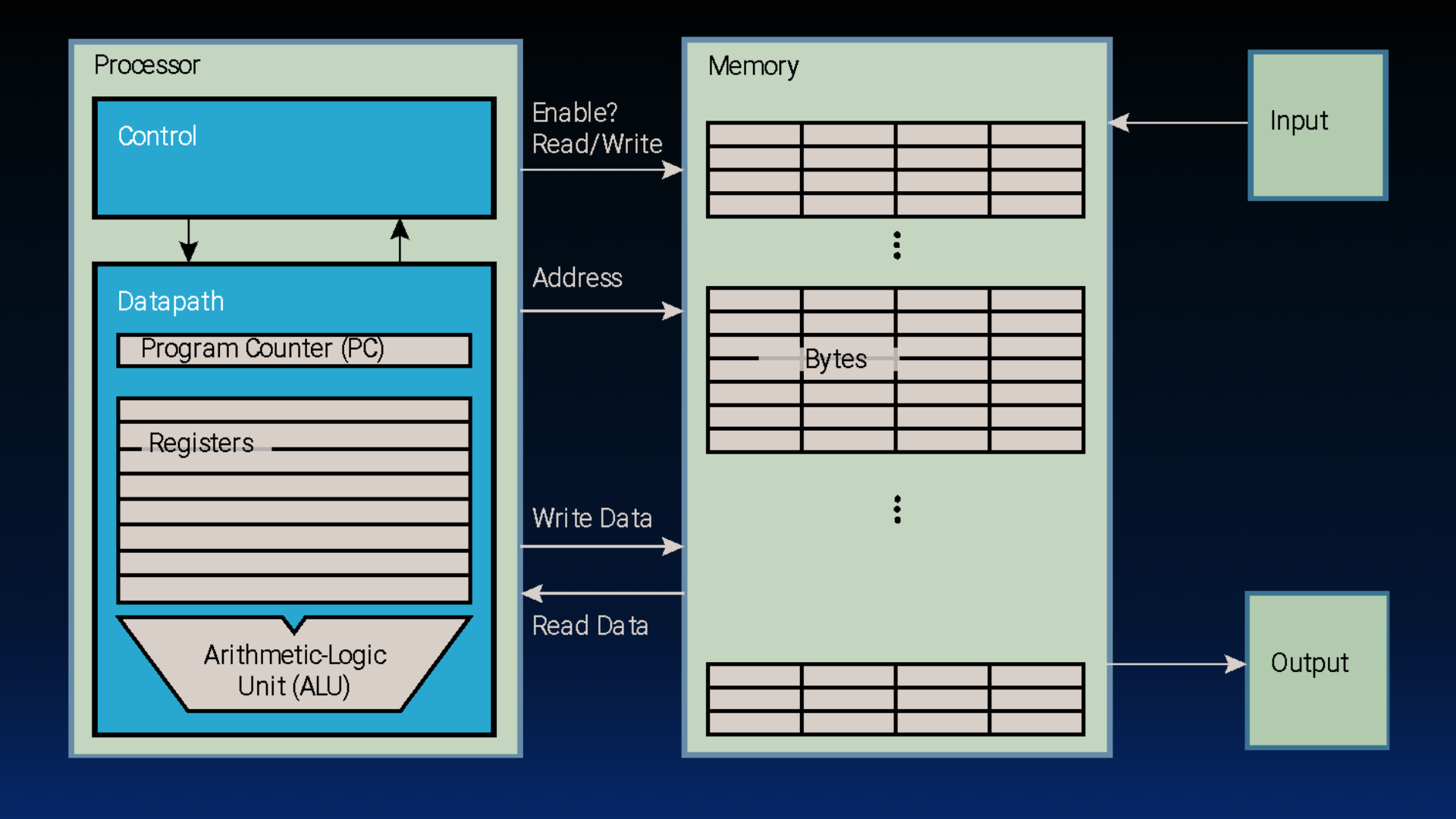
Figure 1:Basic computer layout (See: von Neumann architecture).
Consider the load word instruction lw t0 0(t1). Suppose register t1 holds 0x12F0, and the word starting at memory address 0x12F0 is 1234.
Memory access with cache:
Processor issues address
0x12F0to cacheCache checks for copy of data with address
0x12F0(2a) If cache hit (finds match): cache reads
1234(2b) If cache miss (no match): cache sends address
0x12F0to Memory(2b(i)) Memory reads block with
1234(i.e., block contains data at address0x12F0)(2b(ii)) Memory sends block with
1234to cache(2b(iii)) Cache replaces some block to store new block with
1234(2b(iv)) Cache reads
1234
Cache sends
1234to ProcessorProcessor loads
1234into registert0
Memory access without cache:
Processor issues address
0x12F0to memoryMemory reads
1234@ address0x12F0Memory sends
1234to ProcessorProcessor loads
1234into registert0
When a cache is in the picture, there are two situations that can occur on a memory access:
Cache hit: The data you were looking for is in the cache. Retrieve the data from the cache and bring it to the processor.
Cache miss: The data you were looking for is not in the cache. Go to a lower layer in the memory hierarchy to find the data, put the data in the cache. Then, bring the data to the processor.
5Cache Temperatures
Our goal for cache design is temporal and spatial locality for a range of workloads. We borrow climate terminology to describe cache performance:
Cold: The cache is “empty”.[5]
Warming: The cache is filling with values we will hopefully access again.
Warm: The cache is doing its job, with a fair percentage of hits.
Hot: The cache is doing very well with a high percentage of hits.
6Four Memory Hierarchy Questions
This section is adapted from Patterson and Hennessy. Computer Architecture: A Quantitative Approach, Fifth Edition. 2012. Appendix B.
The answers to these questions help us understand the different tradeoffs of caches (and even of other levels of the memory hierarchy, as we will see in a later section). We will ask these four questions with every example. We start by introducing placement policies:
The literature is inconsistent on whether to refer to the unit of data transferred between a cache and main memory as a “block” or a “line.” You will see both. We will try to stick to “block” where possible, except when quoting sources.
See size comparisons in Sadler et al., ICCD 2006. DOI: Sadler & Sorin (2006)
Caches can never truly be “empty.” Instead, blocks may sometimes contain garbage data with respect to the currently running program. We discuss this in the next section.
- Sadler, N. N., & Sorin, D. J. (2006). Choosing an Error Protection Scheme for a Microprocessor’s L1 Data Cache. 2006 International Conference on Computer Design, 499–505. 10.1109/iccd.2006.4380862