1Learning Outcomes
Explain why the linker can resolve absolute addresses.
Identify when branch/jump instruction addresses are resolved by the assembler or the linker.
Compare and contrast statically-linked and dynamically-linked libraries.
🎥 Lecture Video
1:38 onwards
At this point, the compiler has finished and given you a .s file, and the assembler has finished to produce a .o file (object file). You might have a lot of .o files, plus library files like .a files—which are just big packages of .o files wrapped together (see earlier figure). The linker’s job[1] is to gather all of these together at the table and produce an a.out executable file.
Again, we like that the linker enables separate compilation of different parts of our program. We discuss some tradeoffs later in this section.
From our overview:
The linker patches together multiple object modules to produce an executable. It resolves all the assembler’s “TODO items,” including relocating everything for the final executable:
Put together text segments from each
.ofile.Put together data segments from each
.ofile, then concatenate this onto the end of Step 1’s segment.Resolve references, i.e., addresses that the assembler wasn’t able to resolve.
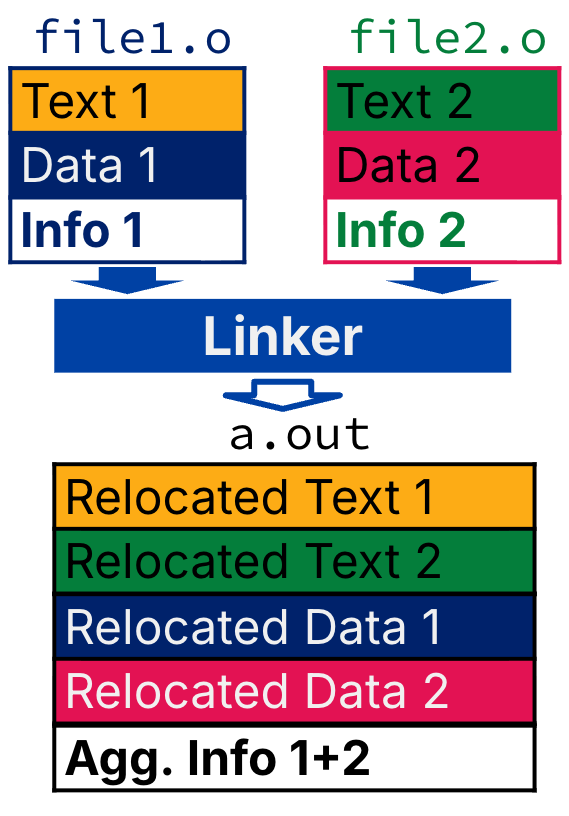
Figure 1:Flow chart for linker components.
2Resolving References
We will likely not test the details of resolving references, but for those who are curious:
For RV32, linker assumes first text segment starts at address
0x10000.The linker knows the length of each text and data segment and the ordering of text and data segments. The linker then calculates the absolute address of (1) each label to be jumped to, and (2) each piece of static data referenced.
The linker then resolves references. It searches for each reference (data or label) in all “user” symbol tables. If not found, it then searches library files (e.g., for
printf). Once the absolute address is determined, it fills in the machine code appropriately by editing specific instructions for relocation.
Finally, the linker outputs an executable containing text and data along with header/debugging info.
3[Aside] Static vs. Dynamic Linking
So far, we’ve described the traditional way: statically-linked libraries. The executable includes the entire library, even if not all of it is used by the user program. The library is now part of the executable–if the library updates, we won’t get the fix unless we recompile the user program.
An alternative is dynamically-linked libraries (DLL), common on Windows and UNIX platforms. The prevailing approach in this model is to link at the machine code level at loadtime: the loader makes room for the library, stuffs it in, and runs it.
Tradeoffs:
Space vs. Time:
With statically-linked libraries, we get a self-contained executable that ultimately is very large.
With DLL, storing a program requires less disk space; less time to send a program. Furthermore, two programs require less memory (if they share a library). However, there is now runtime overhead; there is extra time needed to dynamically link libraries.
Reasonable handling of upgrades
With statically-linked libraries, if a library has a security hole or a bug fix, every single developer has to recompile and resend updates to their users because the old, broken library is baked into their
a.out.With DLL, replacing libXYZ.so upgrades every program using library XYZ. However, DLL introduces complexity: we now need multiple files to run a single program. Having the program executable isn’t enough anymore!
Overall dynamic linking adds complexity to compiler, linker and OS. However, its benefits outweigh its complexities.
Figure 3:Compilation is a slow process. xkcd, explainxkcd