1Learning Outcomes
Explain how caches leverage temporal and spatial locality.
Trace memory access with caches.
Get familiar with key cache terminology: cache hit, cache miss, and cache line (i.e., block).
🎥 Lecture Video: Locality, Design, and Management
🎥 Lecture Video
2Memory Caches
Caches are the basis of the memory hierarchy.
How do we create the illusion of a large memory that we can access fast? From P&H 5.1:
Just as you did not need to access all the books in the library at once with equal probability, a program does not access all of its code or data at once with equal probability. Otherwise, it would be impossible to make most memory accesses fast and still have large memory in computers, just as it would be impossible for you to fit all the library books on your desk and still find what you wanted quickly.
Table 1:Principles of temporal and spatial locality.
| Property | Temporal Locality | Spatial Locality |
|---|---|---|
| Idea | If we use it now, chances are that we’ll want to use it again soon. | If we use a piece of memory, chances are we’ll use the neighboring pieces soon. |
| Library Analogy | We keep a book on the desk while we check out another book. | If we check out volume 1 of a reference book, while we’re at it, we’ll also check out volume 2. Libraries put books on the same topic together on the same shelves to increase spatial locality. |
| Memory | If a memory location is referenced, then it will tend to be referenced again soon. Therefore, keep most recently accessed data items closer to the processor. | If a memory location is referenced, the locations with nearby addresses will tend to be referenced soon. Move lines consisting of contiguous words closer to the processor. |
3Memory Access with/without a Cache
Consider how memory access works with a cache, as in Figure 1.
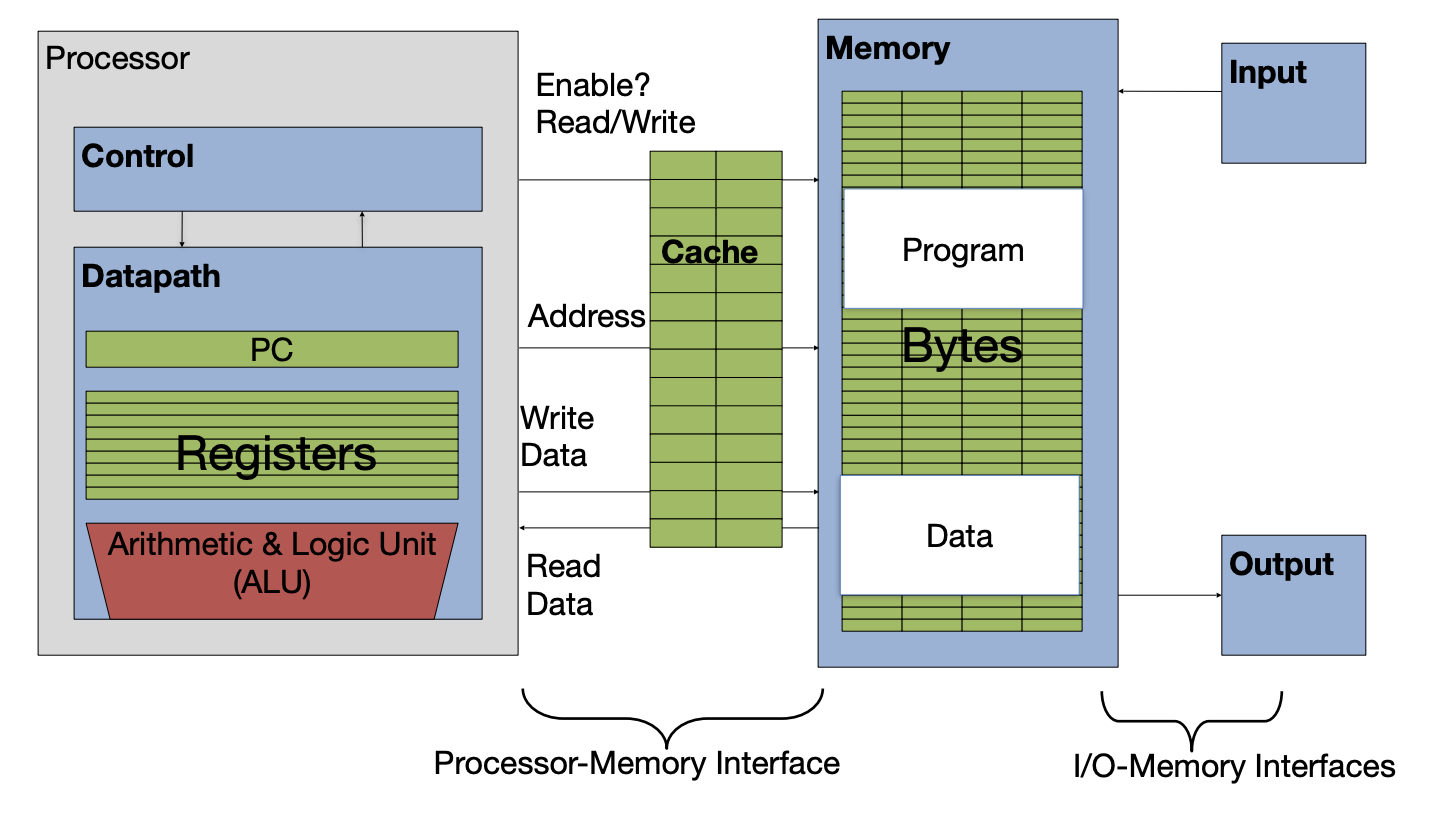
Figure 1:Caches in the basic computer layout (from an earlier section).
When a load or store instruction is accessed, memory data access is requested. There are two situations that can occur:
Cache hit: The data you were looking for is in the cache. Retrieve the data from the cache and bring it to the processor.
Cache miss: The data you were looking for is not in the cache. Go to a lower layer in the memory hierarchy to find the data, put the data in the cache. Then, bring the data to the processor.
We discuss strategies for associating addresses with cache lines in detail (later).
4Key Cache Terminology
Lines (also called blocks) of data are copied from memory to the cache. A cache line is the smallest unit of memory that can be transferred between the main memory and the cache Each line has its own entry in the cache.
Line size (also called block size) is the number of bytes of data stored in this cache line. Each line in a cache has the same line size.[1]
Capacity is the size of a cache, in bytes.
Where we place a new line from memory depends on its placement policy. Placement policy additionally determines the metadata overhead for this cache. We discuss three types of placement policies in this course:
Set-Associative Caches - Direct Mapped Caches
Tag, valid bit, dirty bit, etc. Discussed in the next chapter.