1Learning Outcomes
Explain the two motivations for virtual memory.
Define virtual memory terminology: virtual address space, physical address space, virtual page number, physical page number, page offset.
Describe the two key features of virtual memory: address translation and paged memory.
Explain why protection between processes is needed to allow safe sharing of memory across processes.
🎥 Lecture Video
🎥 Lecture Video
In earlier sections, we have seen that caches provide fast access to recently-used portions of a program code and data. The main memory can similarly act as a “cache” for secondary storage, or lower layers of the memory hierarchy like disk (nowadays, SSD). This concept is virtual memory: a means of giving each process[1] the illusion of access to a full memory address space that it has completely for itself.
There are two core components of virtual memory discussed in this unit. We will define the terminology as we go.
Translation between virtual addresses and physical addresses.
Pages as a memory unit in both virtual and physical address spaces.
2Motivations
There are two major motivations for virtual memory, which was conceived in the 1950s (Wikipedia). Historically, Motivation 1 below was more important. Memory has since become relatively cheap, and Motivation 2 is much more relevant today. Toggle between the tabs below.
Virtual memory removes programming burdens of a small, limited amount of main memory. Without virtual memory, we run into situations like Figure 1.
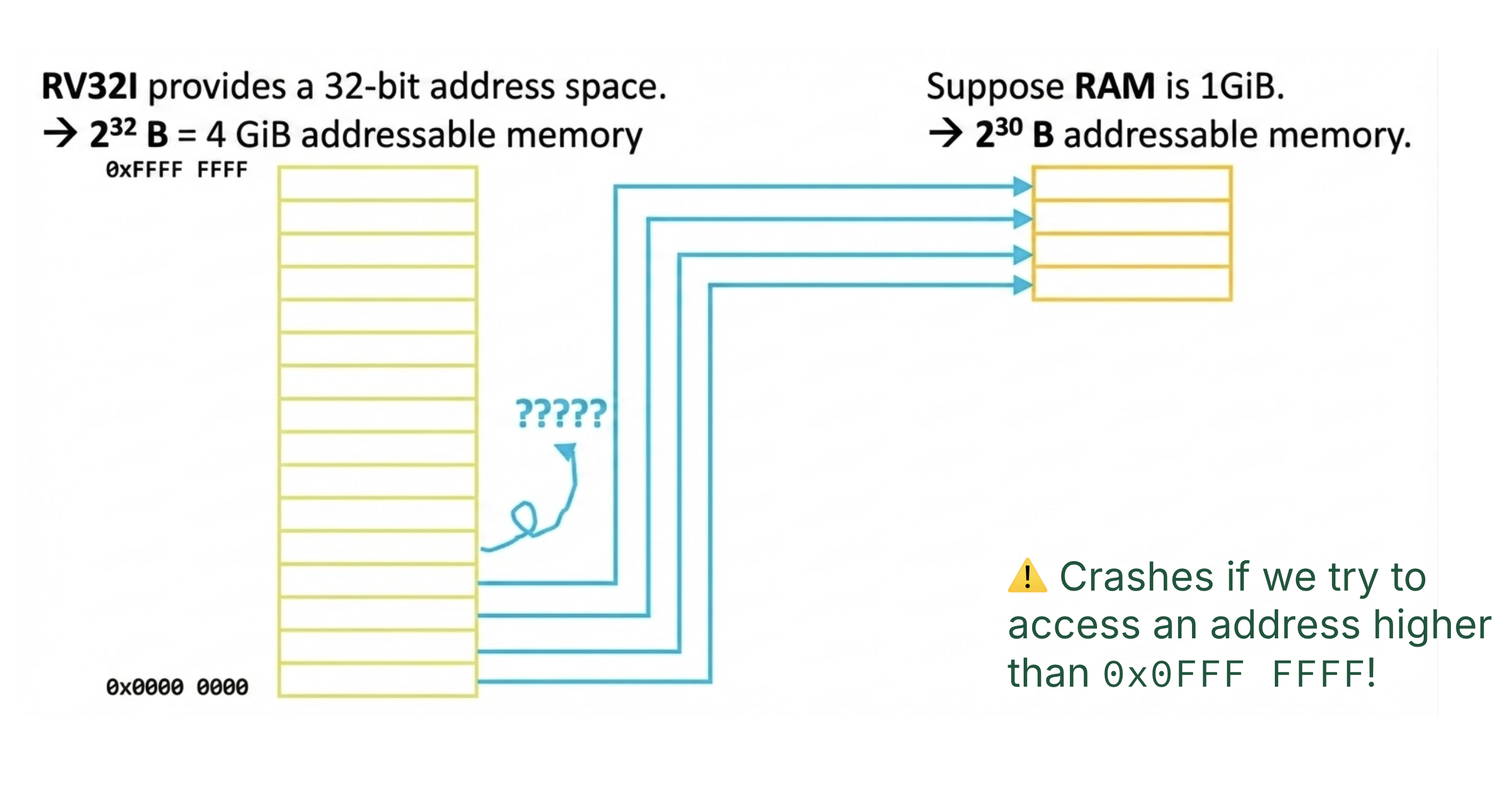
Figure 1:What happens if physical memory is too small?
In Figure 1, main memory is 1 GiB = 230 bytes, which is smaller than an RV32I’s program address space (a 32-bit architecture, meaning 232 bytes = 4 GiB of addressable memory). We consider a scenario where we map each of the lower 230 bytes of the address space onto the available 230 bytes of physical RAM. However, accesses to higher parts of the address space (addresses above 0x0FFFFFFF) would crash because they refer to locations that don’t exist.
Virtual memory allows for efficient and safe sharing of memory among several programs. Without virtual memory, we run into situations like Figure 2.
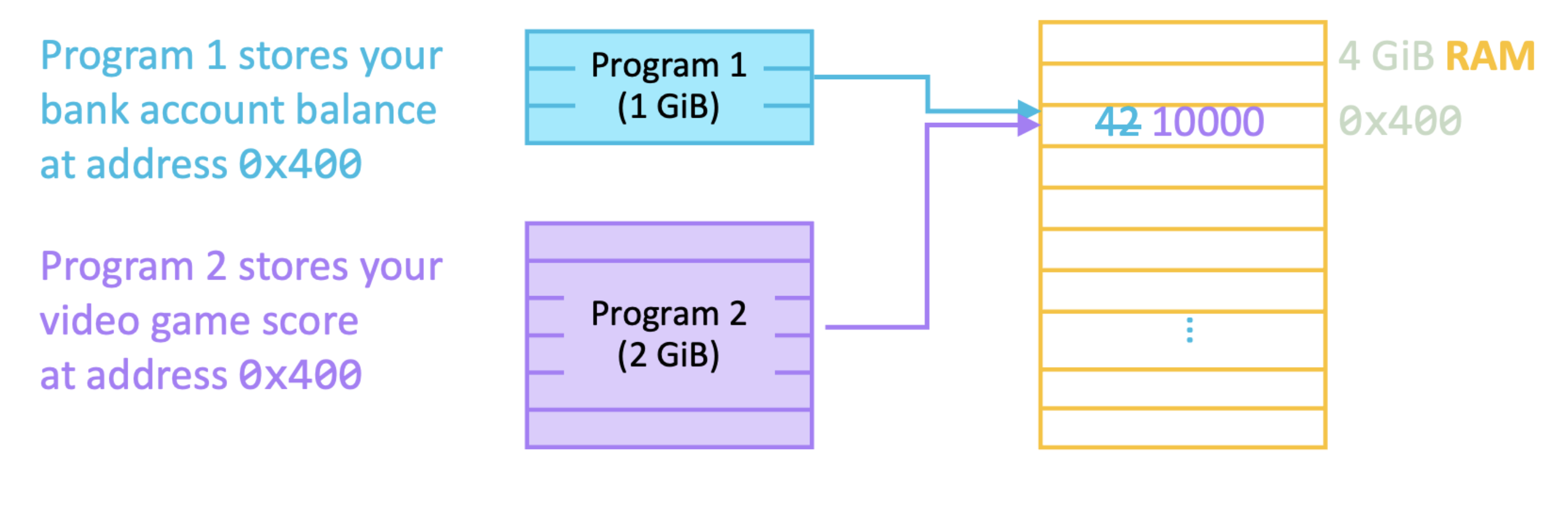
Figure 2:How do two programs share the same memory?
If Program 1 stores your bank account balance @ address 0x400, and Program 2 stores your video game score @ address 0x400, we may optimistically hope that getting a high score of 10000 will suddenly overwrite your account balance. Virtual memory provides protection and isolation between processes, so that both programs can read and write to overlapping addresses without impacting each other. While getting rich quick sounds awesome, if all processes could access data at shared addresses, they could corrupt other processes and cause crashes.
3Translation: Virtual Addresses and Physical Addresses
This section defines important terminology for virtual memory.
In a previous section, we have defined the address space as the hypothetical range of addressable memory locations on a particular machine. Now, we update this definition to differentiate between virtual addresses and physical addresses.
A virtual address space is the address space that a program uses for their memory access instructions (loads, stores, and instruction-fetching). It is the set of addresses that a user program knows about.
The physical address space is the set of addresses that map to actual physical locations in main memory.
We will call main memory physical memory to differentiate it from virtual memory.
Virtual memory means that when run, 32-bit programs will all use the same 4GiB address space (addresses 0x00000000 to 0xFFFFFFFF), as shown in Figure 4. This means that virtual addresses used by separate processes may conflict and overlap (i.e., three separate processes may try to write to the virtual address 0x50000000).
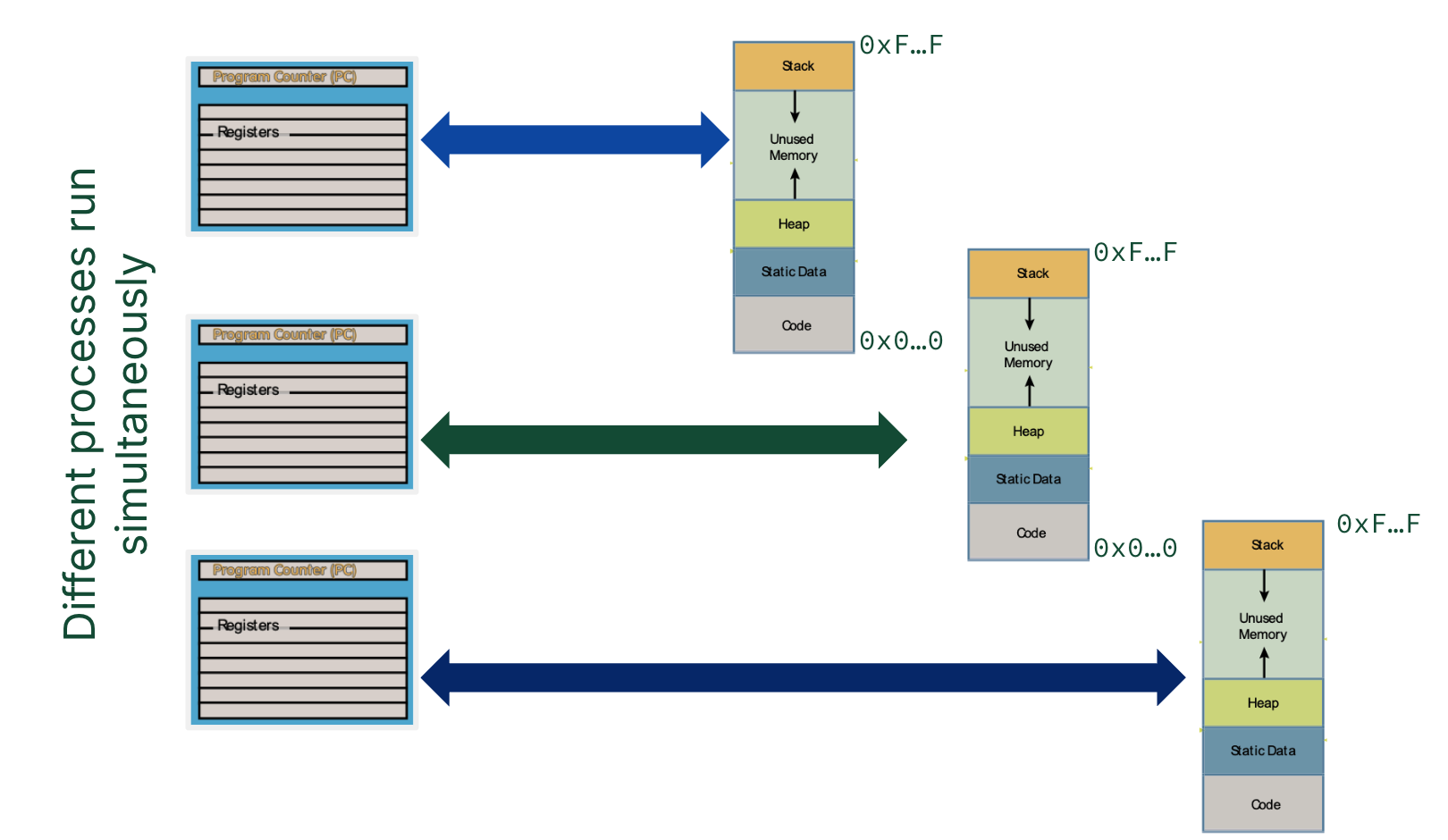
Figure 4:Each 32-bit process uses virtual addresses to address a 32-bit virtual address space.
Address translation supports protection between processes (Motivation 2). When a process provides a virtual address, a “memory manager”[2] translates it into a physical address, which can then be used to access the data at a physical location in main memory. In this way, the virtual address 0x50000000 for three separate processes will map to three separate locations in physical memory.
Address translation is the key to mapping virtual address spaces from different processes to the singular physical address space provided by physical memory, as shown in Figure 5.
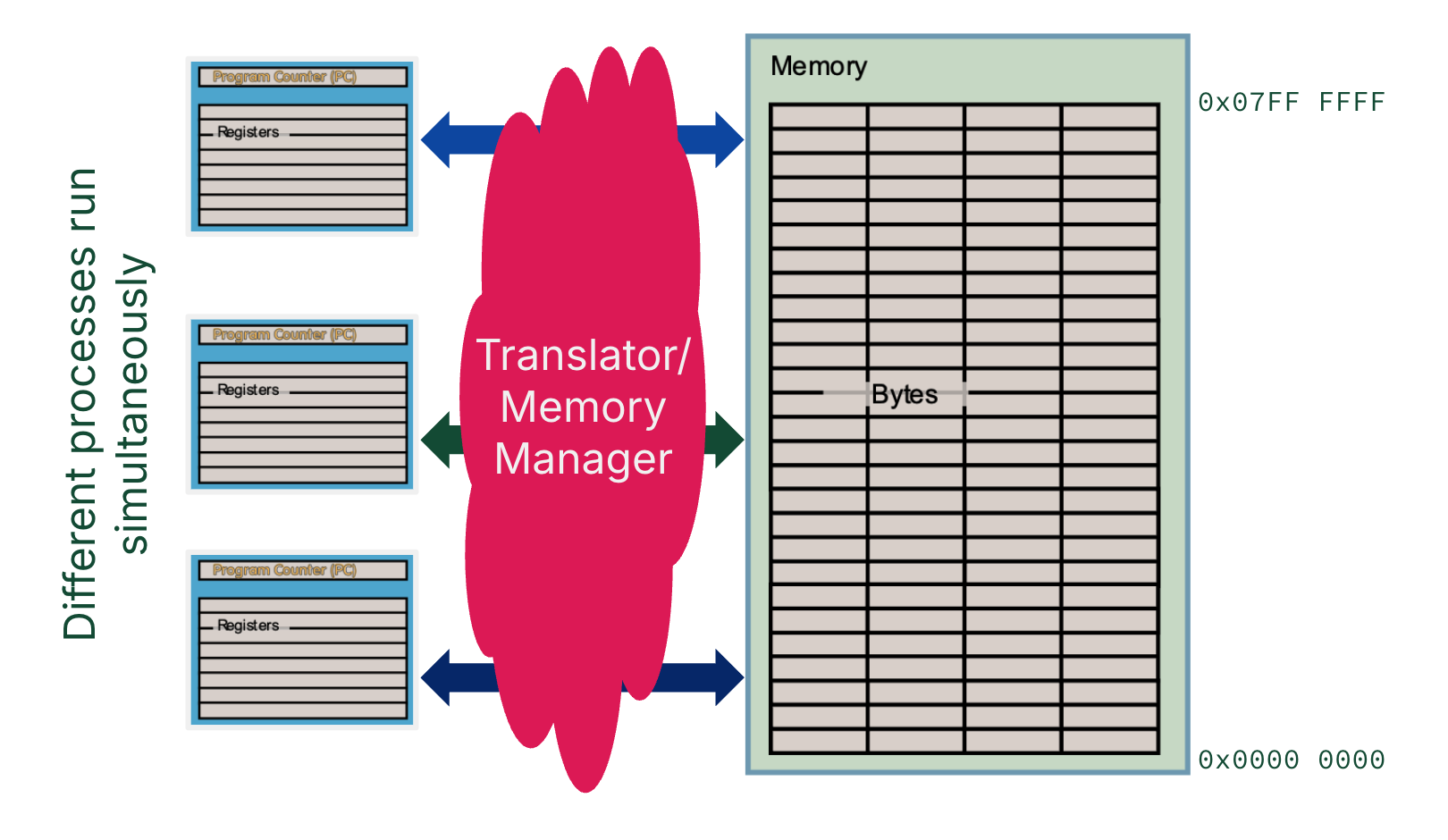
Figure 5:Physical addresses are used for the physical address space available on memory. For a processor to access a location in memory, a memory manager[2] translates virtual addresses to physical addresses.
4Paged Memory
To run programs larger than main memory (Motivation 1), most of the data needed for a program must live somewhere other than main memory. The address space needed to run a program is therefore stored across two layers of the memory hierarchy: main memory and disk.
Recall Jim Gray’s space-time analogy of locality. Accessing disk is four orders of magnitude slower than accessing memory (1 ms vs. 100 ns). Any reasonable virtual memory implementation should use main memory to store temporally or spatially local data, then fetch from disk as frequently as possible. Furthermore, when disk access is needed, a sizeable chunk of data is transferred in order to reduce repeated expensive disk accesses.
The concept of paged memory dominates. A disk access loads an entire page into memory. The size of a page should be large enough to amortize high access time (i.e., much larger than the ~128 B cache blocks and 4-8 B words). A typical page size ranges from 4-16 KiB.
There is one page size per system; this page size is used to break up both physical memory and virtual memory into pages.
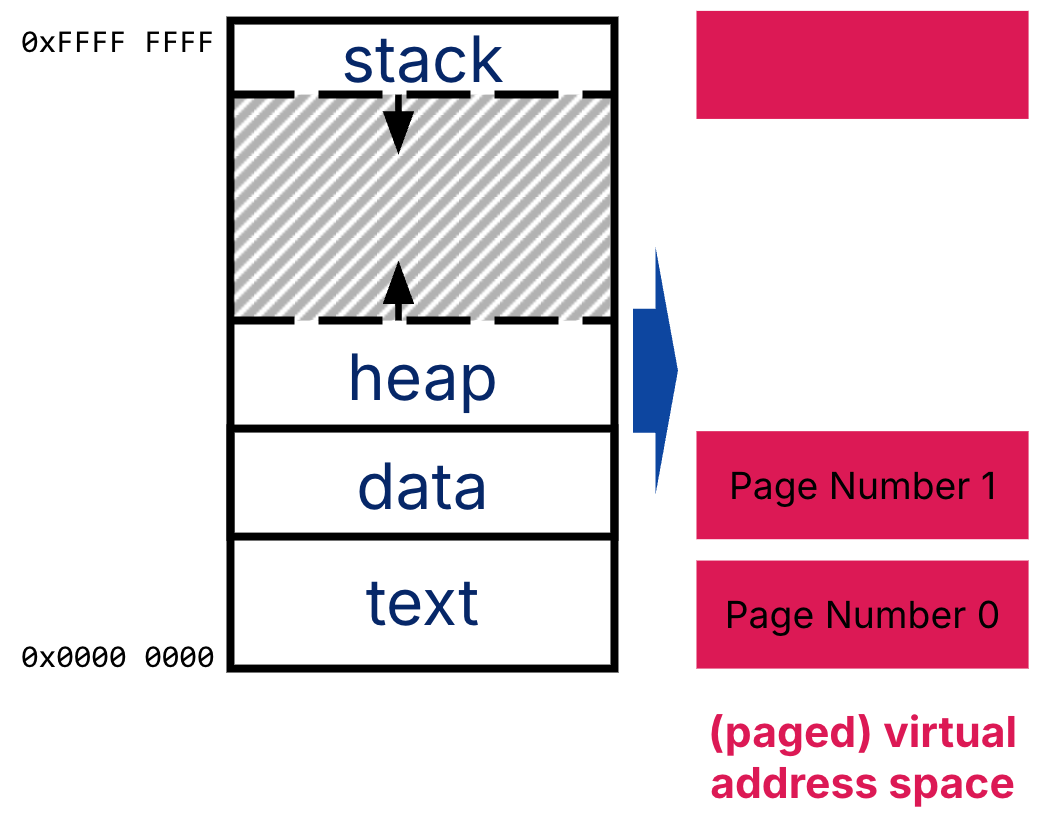
Figure 6:The virtual address space is broken up into pages. Each virtual page has a virtual page number, indexed from low to high.
The course hive machines have 4 KiB pages, a 48-bit virtual address space,[3] and a 39-bit physical address space.[4]
$ cat /proc/cpuinfo
processor	: 0
...
address sizes	: 39 bits physical, 48 bits virtual

$ getconf PAGESIZE
4096
On the Apple M4 Chip:
$ sysctl -a | grep virtual
machdep.virtual_address_size: 47

$ getconf PAGESIZE
16384
Memory translation maps a Virtual Page Number (VPN) to a Physical Page Number (PPN). Figure 7 illustrates the translation of 32-bit virtual addresses to 48-bit physical addresses, where the page size is 4 KiB ( B).
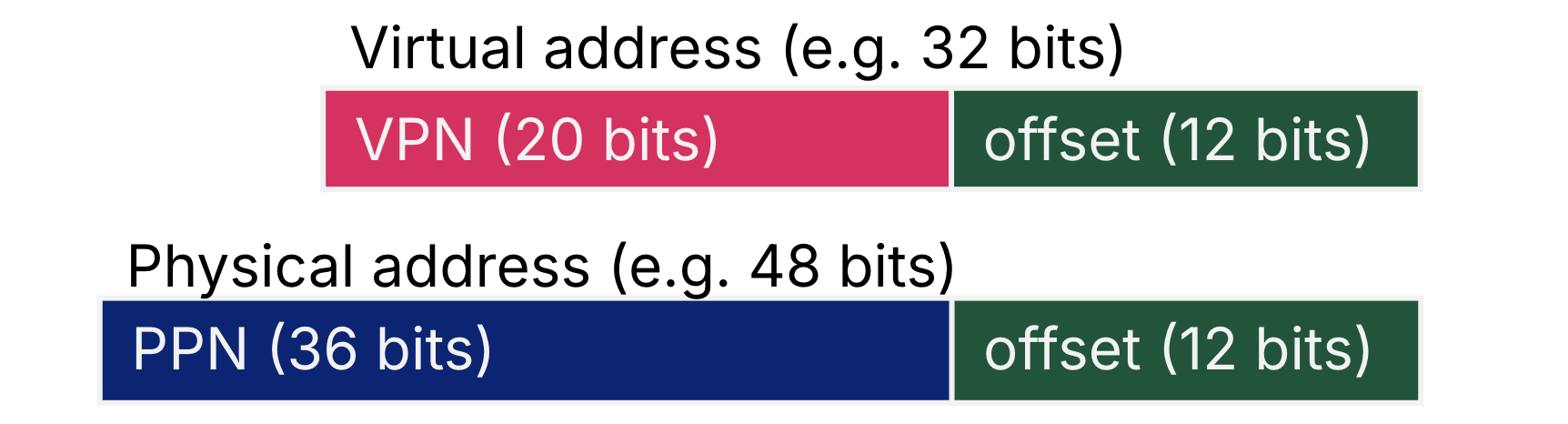
Figure 7:Each VPN maps to a PPN. Virtual pages and physical pages are the same size, so the page offset is the same.
A virtual address is decomposed into a virtual page number (VPN) and a page offset. For a 32-bit virtual address with 4 KiB pages, the VPN is the upper 20 bits and the page offset is the lower 12 bits.
A physical address is decomposed into a physical page number (PPN) and a page offset. For a 48-bit physical address with 4 KiB pages, the PPN is the upper 28 bits and the page offset is the lower 12 bits.
As shown in Figure 7, the address translation mechanism of virtual memory works regardless of whether physical memory is smaller or larger than the virtual address space capacity.
Show Answer
Page offset: = (16 KiB) = = 14 bits
VPN = 32 - 14 = 18 bits
PPN = (8 GiB) - 14 = = 33 - 14 = 19 bits
Show Answers
True
True
True
True
We discuss this virtual-to-physical address translation in the next section.
A process is a currently running program.
The “memory manager” cloud shown in Figure 5 is implemented with a combination of hardware (memory controller) and software (operating system). We discuss this more in the next section.
Why 48 bits virtual? The course hive machines are Intel x86-64, which should mean 64-bit-wide virtual addresses. Put simply 64-bit is huge, and 48-bit is good enough (address space of 256 TiB). When 64-bit pointers are used, the CPU just reads the lower 48 bits. Read more on StackOverflow.
Why 39 bits physical? Based on the Intel specifications, course hive machines have 128 GiB of memory, which should mean 34-bit-wide physical addresses. In practice, the physical address space does not always exactly map to the amount of physical memory because of the memory controller. Read more on Super User.